Custom webhooks
You can integrate Chromatic into other services and script custom behavior to support advanced workflows using webhooks.
- Go to your Chromatic project and click the manage tab in the sidebar. Scroll down to “Integrations”.
- Click the “Add webhook” button in the custom webhook section, then paste your webhook into the input.
If you’re currently using v1 webhooks, read the upgrade guide.
Build updates
When a build’s status changes, we’ll send a POST request to your webhook with a body that looks like this:
{
  "version": 2,
  "event": "build",
  "build": {
    "number": 123,
    "branch": "main",
    "commit": "f6f223efb3b99b83ac3b0b6ece9f9620619933c1",
    "committerName": "John Doe",
    "status": "ACCEPTED", // See table below for details
    "result": "SUCCESS",
    "storybookUrl": "https://5dca7f6a6ce19b00201febb7-yubzntxvow.chromatic.com/",
    "webUrl": "https://www.chromatic.com/build?appId=5dca7f6a6ce19b00201febb7&number=123",
    "changeCount": 12,
    "componentCount": 42,
    "specCount": 100,
    "project": {
      "name": "my-project",
      "accountName": "my-org",
      "accountAvatarUrl": "https://avatars.githubusercontent.com/u/24584319?s=200",
      "webUrl": "https://www.chromatic.com/builds?appId=5dca7f6a6ce19b00201febb7"
    }
  }
}
Review updates
Similarly, we call your endpoint when a review is created:
{
  "version": 2,
  "event": "review",
  "review": {
    "number": 1,
    "title": "My review",
    "status": "OPEN", // | "MERGED" | "CLOSED"
    "baseRefName": "main",
    "headRefName": "feature",
    "isCrossRepository": false,
    "webUrl": "https://www.chromatic.com/review?appId=5dca7f6a6ce19b00201febb7&number=1",
    "author": {
      "name": "John Doe",
      "username": "example",
      "avatarUrl": "https://avatars.githubusercontent.com/u/24584319?s=200"
    }
  }
}
Review decisions
When a reviewer is assigned to a review, or they approve the changes, we send an update like this:
{
  "version": 2,
  "event": "review-decision",
  "reviewDecision": {
    "status": "PENDING", // | "APPROVED"
    "project": {
      "name": "my-project",
      "accountName": "my-org",
      "accountAvatarUrl": "https://avatars.githubusercontent.com/u/24584319?s=200",
      "webUrl": "https://www.chromatic.com/builds?appId=5dca7f6a6ce19b00201febb7"
    },
    "review": {
      "number": 1,
      "title": "My review",
      "status": "OPEN", // | "MERGED" | "CLOSED"
      "baseRefName": "main",
      "headRefName": "feature",
      "isCrossRepository": false,
      "webUrl": "https://www.chromatic.com/review?appId=5dca7f6a6ce19b00201febb7&number=1",
      "author": {
        "name": "John Doe",
        "username": "example",
        "avatarUrl": "https://avatars.githubusercontent.com/u/24584319?s=200"
      }
    },
    "reviewer": {
      "name": "John Doe",
      "username": "example",
      "avatarUrl": "https://avatars.githubusercontent.com/u/24584319?s=200"
    }
  }
}
The review event currently fires only for manual UI Reviews.
How to integrate custom webhooks
Chromatic will make a POST request with the body above to the designated webhook URL. That gives you flexibility to catch the webhook response and customize it to fit the service you’re integrating with.
Most customers set up a simple proxy app to customize the webhook message. Below are some starter projects for known Git providers that use Express as a proxy to help you integrate with Chromatic.
| Git provider | Repository |
|---|---|
| GitHub | Source |
| GitLab | Source |
Versioned webhooks
Our webhooks are versioned and won’t introduce breaking changes when we roll out an update. Our requests include the X-Webhook-Version header (e.g., 2) to indicate what version was used and a "version" property in the JSON request body. We may introduce new events or add new fields, properties, or HTTP headers without incrementing the version number, as we consider them non-breaking changes.
If you’ve been using a custom webhook for a long time, or used to have one, your project might still be configured to receive an older webhook type. In this case, you’ll see a prompt like this:
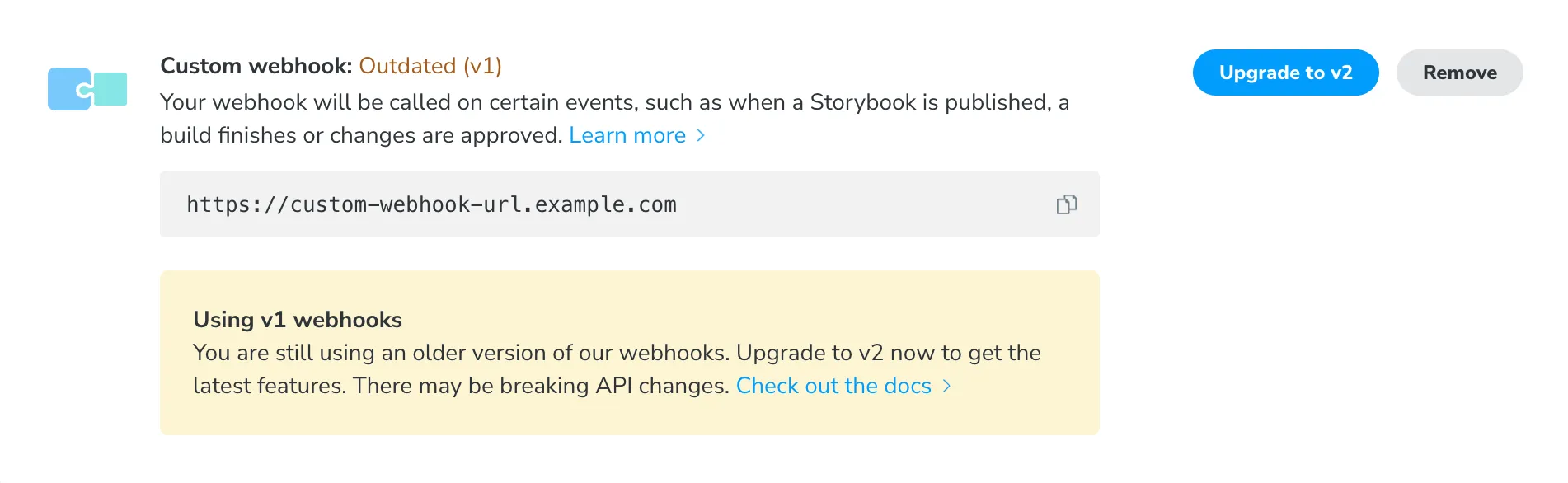
You can either continue to use the existing integration or upgrade your webhook to the latest version. As soon as you’ve upgraded, you’ll start receiving the updated request format, so your endpoint should already be set up to handle it.
Removing and recreating your webhook will not automatically update you to the new format.
Signed webhooks
Chromatic supports signed webhooks through an optional X-Webhook-Signature header. Please contact us via in-app chat or email to enable signed webhooks on your account.
We’ve provided example code for handling these signatures here.
Build result and status codes
| Update | result | status | Legacy status |
|---|---|---|---|
| 🔵 Storybook published | n/a | PUBLISHED | n/a |
| 🔵 Ready for testing | n/a | PREPARED | n/a |
| 🔵 Tests in progress | n/a | IN_PROGRESS | n/a |
| 🌕 Ready for review (has changes) | SUCCESS | PENDING | BUILD_PENDING |
| 🟢 Passed (no changes) | SUCCESS | PASSED | BUILD_PASSED |
| 🟢 Accepted | SUCCESS | ACCEPTED | BUILD_ACCEPTED |
| 🔴 Denied | SUCCESS | DENIED | BUILD_DENIED |
| 🔴 Broken | CAPTURE_ERROR | BROKEN | BUILD_FAILED |
| ⚫️ Canceled | SYSTEM_ERROR | CANCELLED | BUILD_ERROR |
| ⚫️ Error | SYSTEM_ERROR | FAILED | BUILD_ERROR |
| ⚫️ Timed out | TIMEOUT | FAILED | BUILD_ERROR |